
Open the Fasttrack PC software and click on Config from the Menu Bar and select Network E3
The E3 unit is configured with the following, unless specified at time of order:
Delphi Default:
| IP Address: | 192.168.97.96 |
| Gateway: | 192.168.97.5 |
| Mask: | 255.255.255.0 |
Use the E3 Locate and Configure Utility to configure all E3
devices. All units to be configured must be on the local network.
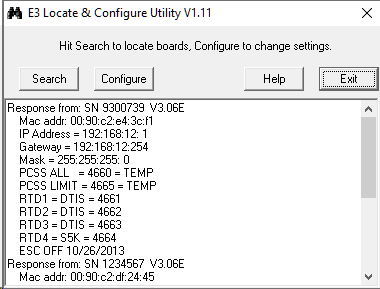
When there are multiple units on the network, identify the unit you
need to change by the unique MAC address. The serial number
located on the E3 engine board will match the last 6 characters of
the MAC address
A search is automatically done as soon as the Network E3 is
launched. Clicking on the Search button will manually search for
any new units added to the network. Once the unit is found you
can configure it by clicking on the Configure button. If more than
one unit found, a list of MAC addresses is displayed to select a
unit from.
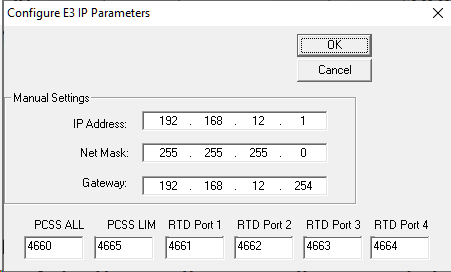
The configuration dialog box allows you to set up the IP address, mask, gateway and port settings for
your unit. Once you click OK the unit will reset so the new settings will take affect.
If the PC is on a secured network or running a Anti-Virus, you may not be able to locate the timer with the Network E3 utility. If this is the case, install the Fasttrack PC software on a laptop and plug directly into the E3 board on the timer.
Comments
0 comments
Please sign in to leave a comment.